
The fastest way to lose a Kenyan customer is to show them a card form.
Not because Kenyans do not own cards. Plenty do. It is because the habit of paying for things in Kenya was formed on a phone, through M-Pesa, long before most online shops existed, and a checkout that asks for sixteen digits and a CVV is asking the customer to switch habits at the exact moment you want them to commit. The World Bank's Global Findex has tracked Kenya as one of the countries where mobile money accounts reach the largest share of adults 1, and the GSMA places East Africa at the centre of mobile money value worldwide 2. You do not need those reports to know it, though. Watch anyone in Nairobi pay for lunch.
This guide is for the founder or developer who has a product, has Kenyan customers (or wants them), and needs to know what accepting payments in Kenya actually involves. It is written in the order you will hit the problems.
Step 1: Decide what the customer sees
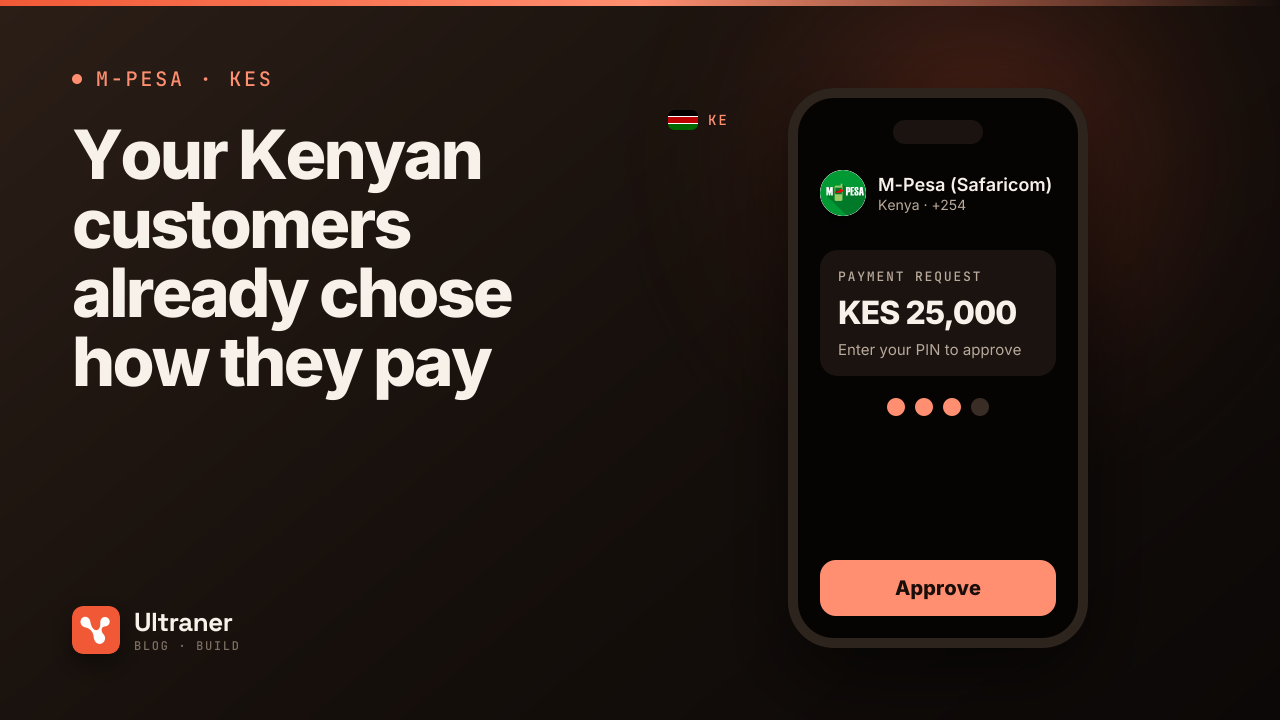
Kenya has three mobile money brands in Ultraner's data: M-Pesa (Safaricom), Airtel Money and T-Kash. M-Pesa is the one that matters most and the one you should design around. The Communications Authority of Kenya publishes quarterly subscription numbers per operator 3, and the gap between Safaricom and everyone else is not subtle.
So the default checkout for a Kenyan payer is:
- Ask for a phone number.
- Pre-select M-Pesa.
- Send a prompt to the phone.
- The customer enters their PIN on their own handset.
- You learn the result on a webhook.
There is no redirect and no card form. The customer never leaves your page, and their PIN never touches your servers or ours.
If you sell to a mix of local and international buyers, keep the card and PayPal options alongside. Ultraner's checkout processes cards through Stripe and accepts PayPal, so a buyer in Berlin and a buyer in Kisumu can pay on the same page. But order matters: for a Kenyan phone number, mobile money goes first.
What does not change between the two is your code. You can see the full list of methods per market on the Kenya payments page, and what each brand looks like on M-Pesa (Safaricom).
Step 2: Get the phone number right
Kenyan numbers are written in at least four ways by real customers: 0712 345 678, 712345678, +254 712 345678, and 254712345678. Only the last one is what the API wants.
The rule is simple. Digits only, with the country code, no plus sign, no spaces. For Kenya that is 254 followed by nine digits, twelve digits in total. Normalise on your side before you send anything:
- Strip spaces, dashes and the leading
+. - If it starts with
0, replace the0with254. - If it is nine digits and starts with
7or1, prefix254. - Reject anything that is not twelve digits afterwards.
That last step is the one teams skip. A malformed number does not fail politely. It fails as a payment that never prompted, which looks to the customer like your shop is broken.
Step 3: Get the amount right (this is where Kenya differs)
Here is the mistake we see more than any other in East Africa. Tanzanian shillings, Ugandan shillings and Rwandan francs are sent as whole numbers. The Kenyan shilling is not. KES has two decimal places, so amounts go to the API in the smallest unit, cents.
| What the customer pays | What you send as amount |
|---|---|
| KES 50 | 5000 |
| KES 1,500 | 150000 |
| KES 12,999.50 | 1299950 |
If a team builds for Tanzania first and then adds Kenya, the bug writes itself: amount: 1500 meant TZS 1,500 there, and in Kenya it means KES 15.00. The customer gets a prompt for fifteen shillings, approves it happily, and your order system marks a KES 1,500 order as paid. Write one helper that converts a display amount to API units by reading the currency's decimal places, and never hard-code the multiplier.
Step 4: Send the charge
The single endpoint for every method is POST /v0/payments/charge. For mobile money, Ultraner reads the country off the phone prefix and routes the request to the rail that serves that network there. Kenyan numbers go through PawaPay, which is the rail behind most markets outside Tanzania. You do not pick the gateway, you pick the network.
POST /v0/payments/charge
X-API-Key: uk_live_...

{ "method": "mobile_money", "amount": 150000, "phone": "254712345678", "provider": "M-Pesa" }
The response comes back immediately with status: "pending". That means "the request was accepted", not "the customer paid". Do not show a success screen yet.
If you prefer to target the rail explicitly, the same charge on /v5/payments/express/mno takes msisdn, amount, currency: "KES", country: "KE" and provider. Both country and provider are required there, because guessing wrong would charge a different network's customer. Full shapes are in the API docs.
A practical note on networks: build your network picker from GET /v5/providers, not from a list you typed into your frontend. It returns the Kenyan networks that are actually live for your account right now, with their limits and current operational status. M-Pesa is the one you can count on.
Step 5: Wait properly
This is the part that makes or breaks conversion. After the prompt is sent, the customer is looking at their phone, not your page. Your page should say so, in plain words: "Check your phone and enter your M-Pesa PIN." Show the number you sent the prompt to, so they can spot a typo.
Then listen for the outcome:
payment.successarrives on your webhook when the network confirms.payment.failedarrives with afailure_reasonif the customer declines, has insufficient funds, or does nothing.
Some networks never report a cancelled or ignored prompt at all. Ultraner closes an unanswered mobile money charge as failed after 10 minutes and sends payment.failed. If the network then confirms the payment after all, you get a payment.success for the same transaction_id. Your handler has to let the later success overrule the earlier failure. If it does not, you will one day refuse to ship an order that was paid.
Verify every webhook signature before you trust it. The webhooks capability page links the exact HMAC check.
Step 6: Know what it costs before you price
Kenya prices mobile money in tiers rather than a flat percentage, and the network's charge sits on top of the rail's own 1%. That makes a KES 100 sale and a KES 10,000 sale cost very different proportions. Two things to do before you set your prices:
- Call
GET /v0/pay/fee-quote/{token}?method=mno&payerCountry=KE&provider=M-Pesafor a few of your typical basket sizes and look at the real numbers. - Decide whether you absorb the fee or gross it up so the payer covers it. Ultraner's catalog supports gross-up pricing if you want your full amount to land.
The pricing page has the current Ultraner side of it.
Step 7: Decide where the money goes
Collected KES lands in your Ultraner balance. From there, settlement to your own bank account works in any country in the world, so a company collecting in Nairobi and banking in London or Kampala is fine. Wallet payouts (sending money into somebody else's M-Pesa) are a different thing. They are live in Tanzania today and being brought up market by market, so if your model involves paying Kenyan suppliers to their phones, plan for settlement and onward payment for now. The payouts page explains the split.
If you are regulated in Kenya, the Central Bank's National Payments System pages are the place to check your own obligations 4. Using a payment provider does not move your licensing questions onto it.
The short version for your engineer
Pin this above the integration ticket:
- Phone:
254+ nine digits, digits only. - Amount: KES in cents.
150000is KES 1,500. - Provider:
M-Pesafirst, list built from/v5/providers. - Pending is not paid. Fulfil on
payment.success, and let a late success beat an earlier failure. - Test in sandbox with a
uk_test_key: a number ending700000001succeeds,700000002fails for insufficient funds,700000005is a customer who declines.
Run those three sandbox numbers through your checkout before you go live, and watch what your customer would see in each case. If any of the three screens leaves you unsure what happened, a Kenyan customer will be unsure too.