
Most checkouts are designed around one assumption: the customer types a card number into the browser and the browser gets an answer in two seconds.
Mobile money breaks both halves. The customer types a phone number, not a card. And the answer arrives when a person has picked up their phone, read a prompt, and entered a PIN. Design for the card assumption and your African checkout will feel broken even when every API call succeeds.
Here are the decisions that matter, in the order a customer meets them.
1. Know the country before you show methods
Every live market has a different set of networks. Kenya has M-Pesa, Airtel Money and T-Kash. Senegal has Wave, Orange Money and Free Money. Cameroon has MTN MoMo, Orange Money and Express Union. Showing all of them to everyone produces a wall of logos nobody can parse.
Sources for the country, best first:
- The phone number, once entered. The prefix is unambiguous.
- The billing country the customer selected.
- IP geolocation, as a default only, never as the final word. Diaspora customers and travellers break it constantly.
Then show the networks for that country, most used first, with card and PayPal below. Ultraner's country pages (Kenya, Cameroon, Zambia and the rest) list exactly what is live per market.
2. Ask for the phone number like you mean it
The phone number is the payment instrument. Treat it with the care you would give a card field.
- Default the country code from the country you detected, shown as a separate, editable prefix. A Kenyan customer types
712 345 678, not+254712345678. - Accept what people type. Leading zeros, spaces and dashes. Normalise to international format on your side. The ITU's E.164 standard defines the format you should end up with 2.
- Validate length per country before submitting. A Tanzanian number and a Rwandan number differ in length, and a typo should be caught in the browser, not by a failed prompt.
- Say why you need it. "We'll send a payment request to this number." One line removes a lot of hesitation.
3. Tell people what is about to happen
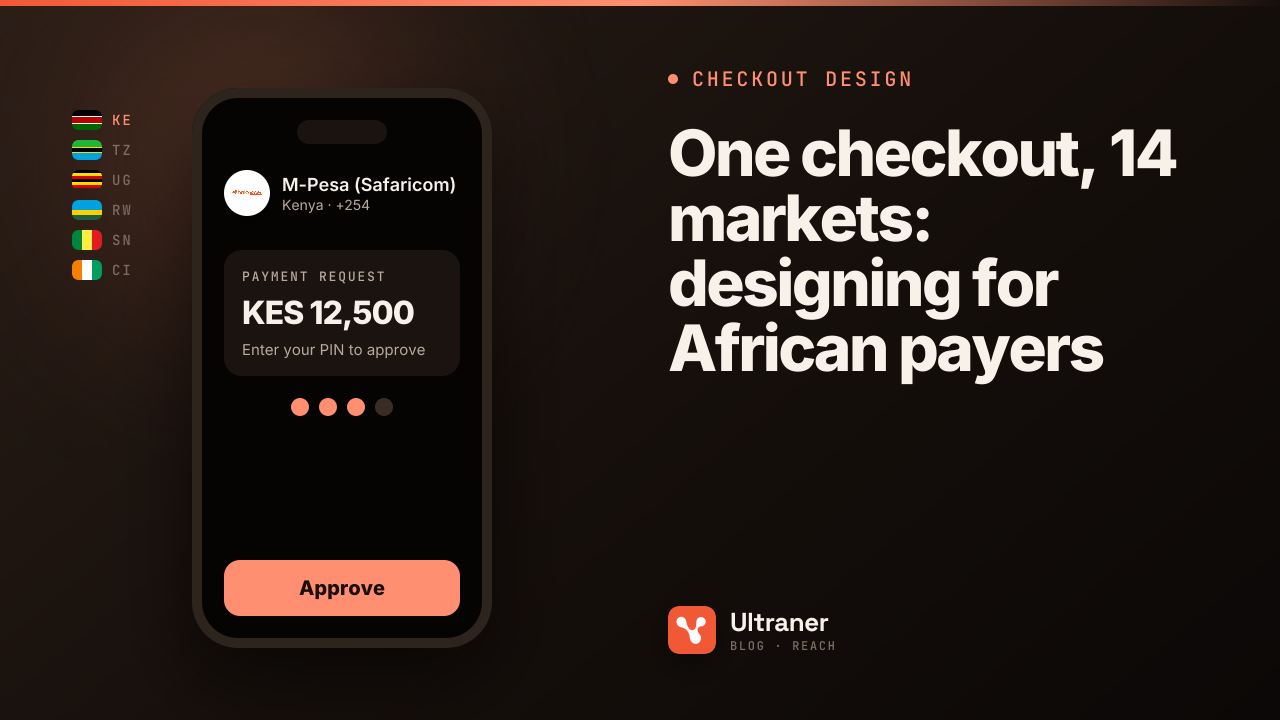
The moment the customer presses pay, the action moves to their phone. If they do not expect that, they stare at the browser waiting for something to happen.
Before the button, one sentence: "You'll get a prompt on your phone. Enter your PIN to approve." After the button, a screen that says the same, shows the number the prompt went to, and keeps a visible way to change it.
On mobile money, the checkout's most important screen is the one where nothing happens in the browser.
4. Design the wait
This is where most checkouts fail. A card authorisation takes a second or two. A mobile money approval takes as long as a human takes: finding the phone, reading the prompt, checking the balance, typing the PIN.
Good waiting states:
- A generous timeout. Show progress for a couple of minutes, not ten seconds.
- Listen for the result; do not make the customer refresh. Ultraner sends a webhook when the payment completes. For an embedded checkout, it also posts a message to your page, so you can react without polling and without redirecting.
- A clear retry. "Didn't get the prompt? Send it again." Resend to the same number, or let them correct it.
- An honest failure. If the customer declined or had insufficient funds, say so plainly and offer another method.
Baymard's research into abandonment points at complicated or untrustworthy checkout steps as a persistent cause 1. An unexplained waiting screen is both.
5. Show the price the way it will be charged
Display the amount in the local currency, the same amount the prompt will show. If the customer's own network charges them a fee on top (in Tanzania, Uganda, Zambia and Gabon it may), say so near the button: "Your network may add a small fee."
For card payers in the same market, Ultraner charges most currencies directly through Stripe, so the card statement matches the page. For PayPal, which settles in USD, show a note that the amount will be converted.
6. Don't hide the card
Mobile money first does not mean card never. Some customers in every market want a card: a corporate card for a team plan, a dollar card for a traveller, a diaspora buyer paying for family. Keep card and PayPal on the same screen, one step below the local methods.
7. Plan for subscriptions
If you sell subscriptions, the first payment is the easy one. On mobile money, every renewal is a fresh prompt the customer approves, because no African mobile money network supports a stored credential you can charge silently. Card renewals run automatically through Stripe.
Design the renewal journey with that in mind: a clear notice before the prompt arrives, a link to the subscription's manage page, and a grace period that tolerates someone who was busy when the prompt came.
8. Build or borrow
You can build all of this yourself on top of the API: one POST /v0/payments/charge handles mobile money, card and PayPal, and routes mobile money by the phone number's country. The docs cover it.
Or you can use a hosted checkout session, which already does the country detection, network list, phone handling, waiting state and method fallback. You mint a one-time session per order, send the customer to it or embed it, and get a webhook at the end.
Most teams start hosted, measure, and only build their own when they need a design the hosted page cannot give them.
A checklist to review your current checkout
- [ ] Methods are chosen by the customer's country, not shown all at once.
- [ ] The phone field has a separate country code and forgiving input.
- [ ] Customers are told the action moves to their phone before they press pay.
- [ ] The waiting state lasts minutes, listens for the result, and offers a resend.
- [ ] Price is shown in local currency, with a note about payer-side network fees where they apply.
- [ ] Card and PayPal remain available below the local methods.
- [ ] Renewals on mobile money have their own messaging.
GSMA's mobile money reports describe a payment system that people already trust with their daily finances 3. Your checkout's job is to feel like part of it, not a foreign form in front of it.